Fall filing season is here, and the stakes are high. The October 31 and November 1 deadlines cover more than 40 states and the District of Columbia, each with its own dormancy periods, property codes, and reporting rules. When you need a fast answer, searching through state statutes or waiting on a support ticket isn’t an option.
As of September 29, 2026, you don’t have to. Ask Sovi®, the AI compliance assistant built into the Sovos platform, now answers regulatory questions directly inside ReportMyUP.
What Is Ask Sovi?
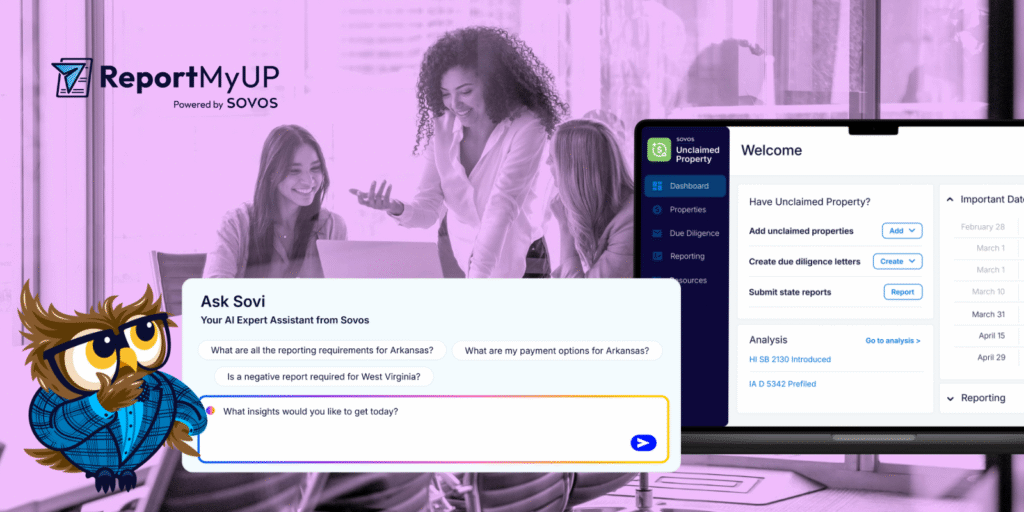
Ask Sovi is Sovos’ AI compliance assistant, built natively into the platform and available directly in the right-hand toolbar inside ReportMyUP. It’s not a generic chatbot pulling answers from the open web. Ask Sovi pulls from Sovos Docs and the ReportMyUP Compliance Resources page, including official state unclaimed property websites, so you get answers grounded in vetted compliance content, not a best guess from a public AI tool.
That matters in unclaimed property. Requirements vary by state, by property type, and by holder. Ask Sovi draws on more than 40 years of Sovos regulatory expertise, maintained by compliance specialists across hundreds of jurisdictions.
Ask Sovi launched earlier this year with product documentation support. The September 29, 2026 update expanded it to include regulatory content, so it now covers the compliance questions that come up most during filing season.
Ask Sovi is available 24/7, responds in plain language, and keeps your data secure within your Sovos environment.
How Ask Sovi Works
Ask Sovi responds to natural language questions, just type your question the way you’d ask a colleague.
With the September 29 update, Ask Sovi now answers both product questions and regulatory questions, including:
- Reporting deadlines and due diligence mailing deadlines by state
- What a code covers and how it applies to your filing
- How long property must be inactive before it’s reportable
- Whether a state requires you to file even when you have nothing to report
- What a state expects when you submit
Ask Sovi also remembers your conversation history. Ask a follow-up, dig into a specific state, and pick up right where you left off.
Your data stays protected. Ask Sovi runs within your secure Sovos environment, uses your existing authentication protocols, and never uses your conversations to train Sovos products. Read the full data privacy FAQ →
The Best Ways to Use Ask Sovi in ReportMyUP
Most AI tools return a link and leave the rest to you. Ask Sovi gives you a direct answer and helps you figure out what to do next, without leaving your active workspace. Here’s where it’s most useful during fall filing.
Check state-specific deadlines before you mail
Due diligence letters must go out 60 to 120 days before you file, and each state sets its own timing. Use Ask Sovi to confirm the mailing deadline before you schedule, especially for states you file in less frequently.
Try: “What is the mailing deadline for Minnesota?”
Confirm dormancy before you report
Unclaimed property rules aren’t uniform. The same property type can carry a three-year dormancy in one state and five in another. Apply the wrong rule and you’ll either report property too early or miss property that’s due.
Try: “What is the dormancy for AC01?” or “What is the dormancy for vendor checks in North Dakota?”
Get a full picture of one state’s requirements
When you’re working a new state for the first time, start with a broad question. Ask Sovi can walk you through deadlines, property codes, dormancy thresholds, and reporting expectations in one conversation.
Try: “What are all the reporting requirements for Iowa?”
Check whether a negative report is required
Not every state requires a negative report, but missing one that does can create the same audit exposure as a missed positive filing. Ask Sovi gives you a fast answer without digging through state documentation.
Try: “Is a negative report required for Virginia?”
Get filing instructions and payment details
When you’re ready to submit, Ask Sovi can surface filing instructions and payment options for the state you’re working in, so you’re not hunting for that information at the end of the process.
Try: “What are the filing instructions and payment options for Texas?”
Skip the internal back-and-forth
Your team can answer routine compliance questions without pulling in a specialist every time. Ask Sovi is available at 7 a.m. or late on a Friday, whenever the question comes up in your workflow. As Casey Zieglmeier, ReportMyUP Product Owner, put it during our October webinar: “You can treat Ask Sovi as your AI assistant. You’ll get instant answers directly in the application, and there’ll be fewer interruptions to productivity.”
A note: Ask Sovi is a research and guidance tool. Sovos doesn’t provide tax, legal, or accounting advice. For complex situations, confirm your approach with your advisors.
How to Get Started Today
Ask Sovi is automatically enabled for all ReportMyUP and ReportMyUP Plus subscribers, no setup required. You can ask your first question in under a minute.
- Log in to ReportMyUP or ReportMyUP Plus.
- Click the Sovi icon on the right-hand toolbar.
- Type your question in plain language.
- Press Enter or click Send. Ask Sovi responds right away.
- Keep the conversation going. Ask follow-ups, start a new thread, or reopen a past conversation from the menu.
Tips for better answers:
- Name the state. “What is the dormancy for vendor checks in North Dakota?” gets a sharper answer than a general question.
- Use the property code when you know it. Codes like AC01 help Ask Sovi pinpoint the exact property type.
- Ask one thing at a time for multi-state questions, then compare answers across states.
The October 31 and November 1 deadlines are close. Log in to ReportMyUP, click the Sovi icon, and start with the state that has the nearest deadline.
Not yet filing with ReportMyUP? Fall deadline season is the right time to start. ReportMyUP tracks your deadlines, calculates dormancy by property type and state, generates state-compliant due diligence letters, and files directly to 30+ states, all in one place. And now, with Ask Sovi built in, you have a compliance assistant ready to answer your questions the moment they come up. Get started with ReportMyUP today →